


Headless CMS vs Traditional CMS: Which One Actually Fits Your Website?
According to Grand View Research, the global headless CMS software market was valued at $1.75 billion in 2025 and is projected to reach $6.23 billion by 2033, growing at a CAGR of 17.5% (Source: Grand View Research). That's not a small trend, it's a sign that the old "one CMS runs everything" approach is starting to crack under the weight of apps, kiosks, multiple websites, and content that now needs to show up in a dozen places at once. If you've ever asked your website developer in Ludhiana why your site feels slow to update or hard to extend to a mobile app, the CMS architecture underneath is usually the real answer.
What Is a Headless CMS, Really?
A traditional CMS (think classic WordPress or Joomla setups) bundles your content, your database, and your front-end design into one tightly coupled system. A headless CMS strips that apart, it stores and manages content through APIs, with no fixed front-end attached, so any application (website, app, smart display, whatever comes next) can pull that content and render it however it wants.
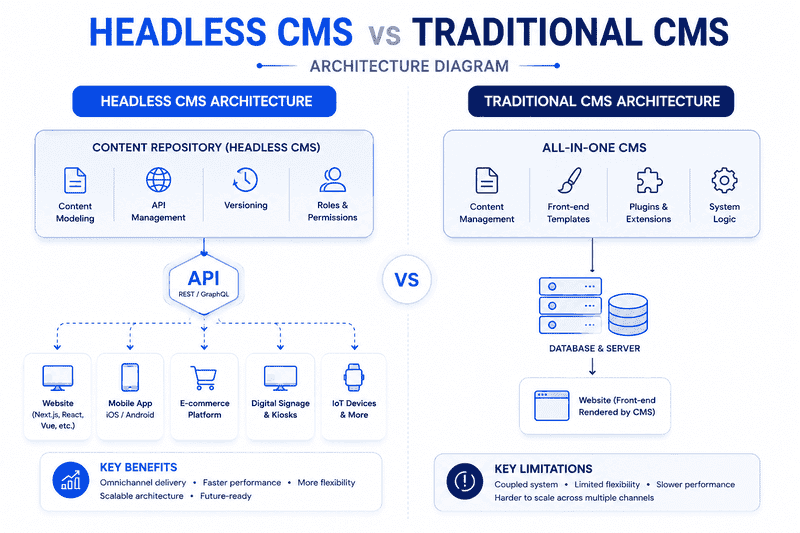
What a headless setup typically includes:
- A content repository accessible via REST or GraphQL APIs
- Reusable content models instead of page-by-page templates
- Independent front-end frameworks (React, Vue, Next.js) consuming the same content
- Built-in versioning, localization, and role-based publishing workflows
Why Businesses Choose a Custom, Professionally Built Setup
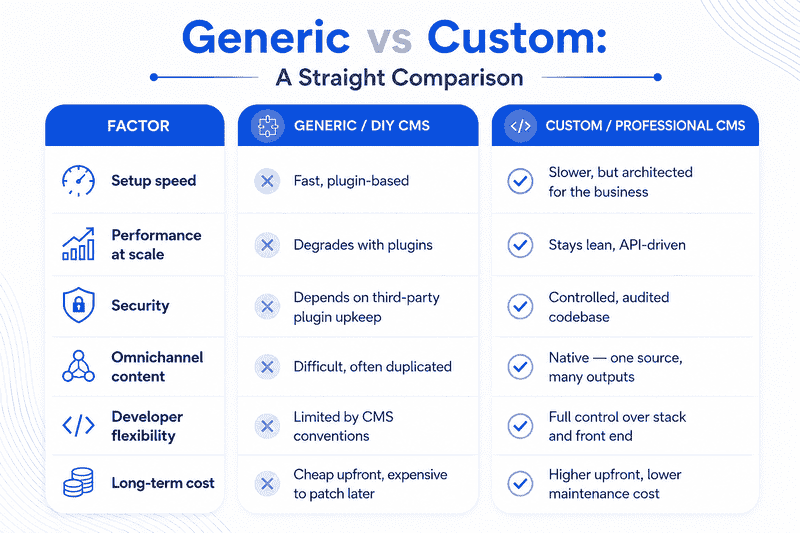
DIY plugin-stacked CMS installs work fine until they don't. Businesses that move to a custom or professionally architected content system usually do it for outcomes like these:
- Faster page loads because the front end isn't dragging along CMS bloat
- One content source feeding a website, mobile app, and marketing screens without duplicate entry
- Fewer plugin conflicts and security patches to chase every month
- Content teams and developers working in parallel instead of blocking each other
- Easier scaling when a business expands into new regions or product lines
Generic vs Custom: A Straight Comparison
When Traditional CMS Still Makes Sense
Not every business needs to go headless, and it would be a bit disingenuous to pretend otherwise. If you run a single small business website with a blog and a contact form, a well-configured traditional CMS is often the pragmatic choice.
- Simple brochure sites with low content complexity
- Budget-constrained projects with a single publishing channel
- Teams without in-house or agency-level developer support
- Sites that rarely need to feed content into apps or other platforms
Mittal Technologies Insight: We still build plenty of traditional WordPress sites for clients who genuinely don't need headless complexity, the goal is matching architecture to actual business need, not chasing what's trendy.
When Headless Becomes the Right Call
Growth-stage businesses tend to hit a point where the traditional model starts limiting them rather than serving them.
- Multiple digital touchpoints (website + app + partner portals)
- Frequent content updates across regions or languages
- Plans to launch a mobile app sharing the same content backend
- Performance-sensitive sites where Core Web Vitals affect conversions
- Teams wanting modern front-end frameworks without CMS constraints
Our own website development company in Ludhiana team has walked several EdTech and SaaS clients through exactly this transition, most recently rebuilding content infrastructure for a platform that needed to serve both a web app and a marketing site from a single source.
Migrations like this rarely go well as a solo effort, which is why it usually pays to loop in people who've done it before, you can see the mix of developers and content strategists on our team who typically handle this kind of project.
Our Process for Migrating to Headless
- Content audit — mapping every content type currently in use
- Architecture planning — deciding on API structure and content models
- Platform selection — matching a headless CMS to team skill and budget
- Front-end rebuild — developing the presentation layer separately
- Content migration — moving and restructuring existing content
- Integration testing — verifying API performance and delivery speed
- Team handover — training content editors on the new workflow
Real Challenges, and How to Handle Them
- Higher initial development cost. Best Practice: Phase the migration by content type instead of a full rebuild in one go.
- Content editors need retraining. Best Practice: Build a simplified editor UI and run hands-on sessions before launch.
- Preview functionality is harder without a live template. Best Practice: Set up a dedicated preview environment tied to the API.
- SEO requires extra front-end discipline. Best Practice: Bake in structured data and meta handling at the framework level, not as an afterthought.
- Vendor lock-in risk with some headless platforms. Best Practice: Choose CMS platforms with open export options before committing.
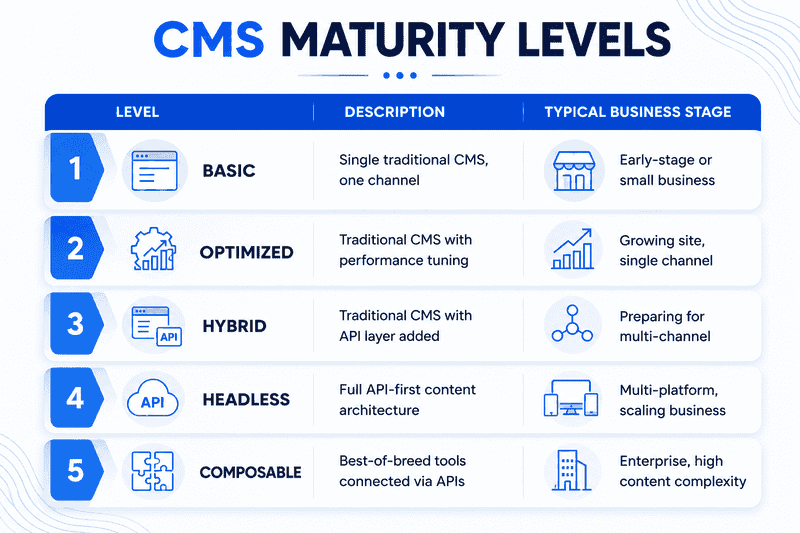
CMS Maturity Levels
How to Measure Success
Business KPIs: content publishing speed, cost per content update, time-to-market for new channels, customer engagement across platforms
Technical KPIs: API response time, Core Web Vitals scores, uptime across integrated channels, content model reuse rate
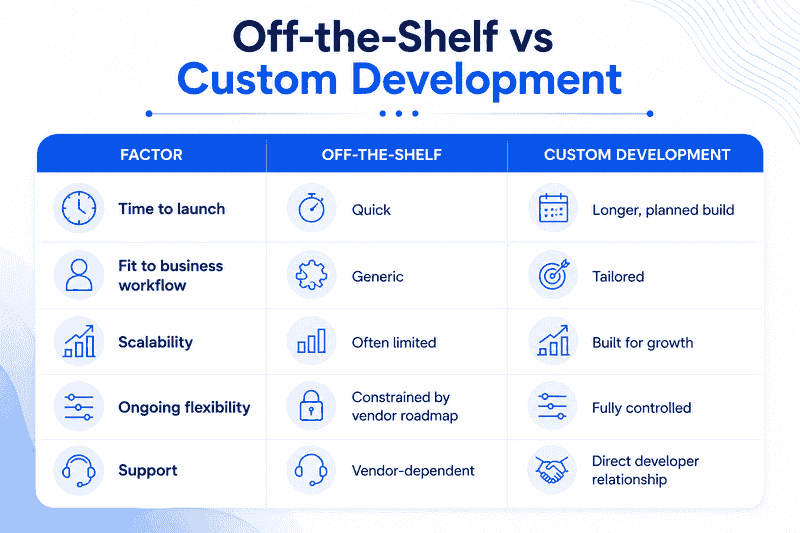
Off-the-Shelf vs Custom Development
Where This Is Heading
- AI-assisted content modeling becoming standard in headless platforms
- Tighter integration between headless CMS and personalization engines
- Growth in composable architecture, mixing best-of-breed tools instead of one suite
- Government and public-sector adoption rising as multilingual, compliant systems become priorities
- Edge-delivered content becoming the default for performance-focused sites
- More SMBs adopting hybrid setups rather than full headless from day one
Wrapping Up
Neither model is inherently better, the right choice depends on how many channels your content needs to reach and how much control your team wants over the front end. If you're a growing business in Punjab weighing your options, our team at a software company in Ludhiana built specifically for this kind of architecture decision would be glad to walk through what fits your setup. You can also see how we approached a similar rebuild in our Zaffar Khan Personal Branding case study.
FAQs
1. Is headless CMS more expensive than traditional CMS?
Usually yes, upfront but the gap often closes over time since there's less plugin maintenance and patching involved.
2. Can I switch from traditional to headless without rebuilding everything?
Partially. A hybrid approach lets you add an API layer to an existing CMS before a full front-end rebuild.
3. Does headless CMS help with SEO?
It can, mainly through better page speed, but only if the front-end team handles meta tags and structured data carefully, headless doesn't do this automatically.
4. Which businesses should avoid headless CMS?
Small, single-channel sites with tight budgets and no in-house or agency dev support usually don't need the added complexity.
5. What's the biggest mistake companies make when going headless?
Underestimating the front-end development effort, headless shifts more responsibility onto the front-end team, not less.
Written by the content team at Mittal Technologies, a website designing company in Ludhiana working with businesses on custom development and content architecture.