


AI Chatbots vs Traditional Customer Support: What Actually Works for Growing Businesses
Gartner predicted in March 2025 that agentic AI will resolve 80% of common customer service issues without human help by 2029. Whether or not the number lands exactly, the direction is hard to argue with. Most owners I talk to have stopped asking whether to automate support. They want to know how much to automate and where people should stay. If you're comparing AI chatbots vs traditional customer support while looking for the best IT company to build it, this should save you a few expensive mistakes.
What Are AI Chatbots and Traditional Customer Support?
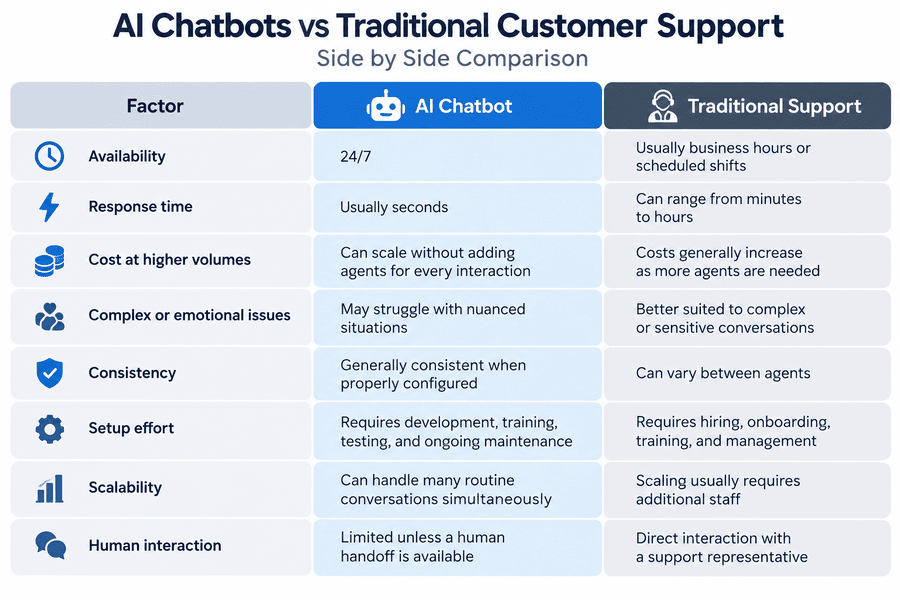
AI chatbots are software agents that answer customer questions in natural language, usually on your website, WhatsApp, or app. Traditional support is people answering phones, email, and live chat, usually in shifts.
Each one covers different ground:
- AI chatbots: instant replies, FAQ handling, order or booking status, lead capture, ticket creation, handoff to a human
- Traditional support: phone calls, complaint resolution, negotiation, refunds, emotional situations, complex troubleshooting
Why Businesses Are Investing in Technology Services for Support
Nobody wakes up wanting a chatbot. They want outcomes, and these are the ones that come up most:
- Replies at 2 a.m. without paying for a night shift
- Shorter queues, so agents handle fewer repetitive tickets
- Consistent answers, whoever is on shift
- Support data (common questions, drop-off points) that feeds back into the website and product
- Room to grow without hiring in a straight line with ticket volume
Where Chatbots Earn Their Place
A chatbot is only as good as the questions you point it at. Start with high-volume, low-risk queries:
- Order tracking and delivery status
- Business hours, pricing ranges, service areas
- Appointment booking and rescheduling
- Password resets and account basics
- Lead qualification before a sales call
- Collecting details so a human agent starts with context
Mittal Technologies Insight: Before choosing any tool, pull three months of support tickets and sort them by topic. In most audits we see, a handful of repeat questions make up the bulk of volume. That's your first chatbot scope. The rest can wait.
Where Human Support Still Wins
I've watched a chatbot cheerfully answer an angry customer with a help-centre link. It went badly. Keep people on:
- Billing disputes and refunds
- Cancellations, where a real conversation can save the account
- Technical faults with no clear pattern
- High-value clients who expect a name, not a bot
- Anything involving distress, safety, or legal risk
Building a Hybrid Model
Most businesses land here: the bot takes the front line and a person takes the hard cases. The handoff is what makes or breaks it. If customers have to repeat themselves, you've made things worse.
Mittal Technologies Insight: Treat the handoff as a design task, not an afterthought. Pass the full chat transcript to the agent, and let customers ask for a human at any point. Our technology services work on support widgets that always start with that one screen.
How the Best IT Services Teams Build a Support Chatbot
- Audit existing tickets and pick the top 10 repeat questions.
- Define what the bot must never answer (refunds, legal, medical).
- Write and clean the knowledge base the bot will draw from.
- Choose the platform and connect it to your CRM or helpdesk.
- Test with real past tickets, not tidy sample questions.
- Launch on one channel first, with human backup visible.
- Review transcripts weekly and fix gaps.
Skipping step 3 is the most common failure I see. A bot trained on outdated pages will confidently give outdated answers.
Challenges You Should Expect
- Wrong answers delivered confidently. Best Practice: restrict the bot to approved sources and add fallback replies for low-confidence questions.
- Customers stuck in loops. Best Practice: offer a human option within two messages.
- Messy or outdated knowledge base. Best Practice: assign an owner and a monthly review date.
- Weak integration with your systems. Best Practice: connect the CRM and order data before launch, or the bot can only offer generic replies.
- Privacy and compliance exposure. Best Practice: mask personal data, set retention limits, and check GDPR or local rules early.
- No measurement. Best Practice: track resolution rate, handoff rate, and customer satisfaction separately, not just chat volume.
Chatbots also have real limits. They struggle with sarcasm, multi-part problems, and languages you haven't tested. Anyone quoting you a fixed automation percentage before seeing your tickets is guessing. The right best IT services partner will tell you that upfront.
AI Tools Commonly Used
- Intercom Fin and Zendesk AI: for teams already on those helpdesks
- Google Dialogflow: for custom builds with more control
- Microsoft Copilot Studio: for businesses inside the Microsoft ecosystem
- OpenAI or Anthropic APIs: for custom assistants tied to your own knowledge base
Where Support Is Heading
- Voice agents handling routine phone calls
- Bots that take actions (issue a refund, rebook a slot), not just answer
- Support and website analytics feeding each other
- More regulation around disclosing that a customer is talking to AI
- Smaller, cheaper models trained on a single company's data
Final Word
AI chatbots handle the repetitive volume, and people handle the moments that decide whether a customer stays. If you want a second opinion on where to draw that line, get in touch with our team and we'll look at your ticket data with you.
FAQs
1. Can an AI chatbot fully replace customer support?
Not safely. It can resolve routine questions, but complaints, refunds, and complex faults still need a person.
2. How much does a support chatbot cost?
It depends on the platform, integrations, and volume. Off-the-shelf tools charge monthly per seat or per resolution, while custom builds carry a higher upfront cost.
3. How long does it take to launch?
A focused pilot on one channel can take a few weeks. Cleaning the knowledge base is usually the slowest part.
4. Will customers accept talking to a bot?
Most will, if the bot is fast, honest about being a bot, and offers an easy route to a human.
5. How do I measure the chatbot's performance?
Track resolution rate without human help, handoff rate, response time, and customer satisfaction scores